| Parameter | Details | Values |
|---|---|---|
q |
Text to encode (URL-encoded string) | string/text |
type |
Output format | svg, utf8 |
https://api.qr.hiiruki.dev/?q=Hello+World
The output format is default to svg if detected browser user agent, otherwise
utf8.
If used svg, a QR code of SVG format would be served with proper Content-Type header
set.
If used utf8, a QR code formatted with UTF-8 characters would be generated.
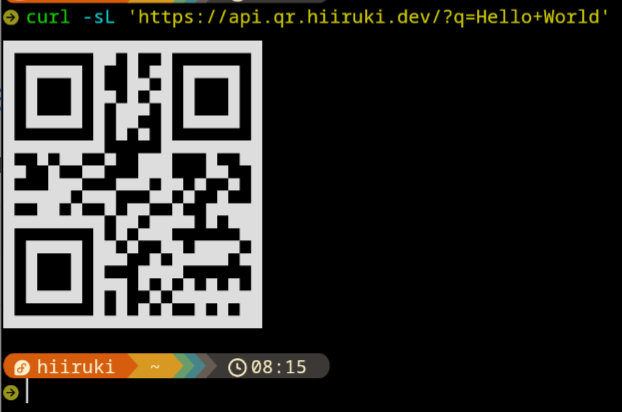
You can use this web service from your terminal with curl command.
Print the QR code in terminal. Because it use curl, so the output is UTF-8
because the user agent settings.
curl -sL "https://api.qr.hiiruki.dev/?q=Hello+World"
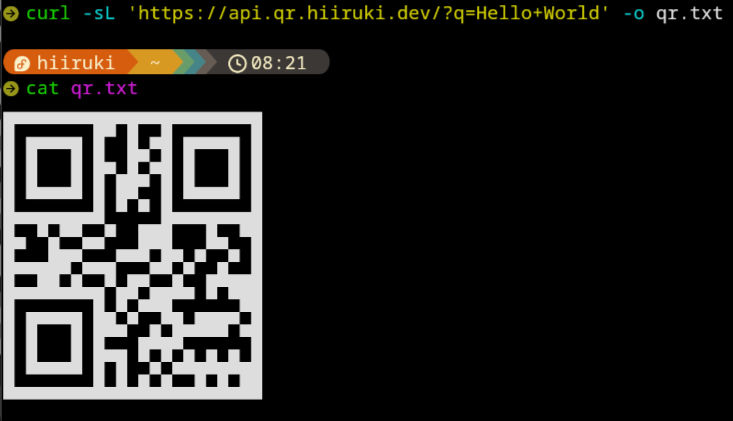
You can specify the output format with type parameter. Which support svg &
utf8 format. Then you can save the output to a file with -o option of
curl.
Save as SVG file:
curl -sL "https://api.qr.hiiruki.dev/?q=Hello+World&type=svg" -o qr.svg
Save as TXT file:
curl -sL "https://api.qr.hiiruki.dev/?q=Hello+World" -o qr.txt